A Shopify backorder notification tells a customer that part of the order they have already placed cannot ship yet, and when it will. Shopify does not send one, which is the whole problem: a customer places an order, one or more lines cannot ship, and nobody tells them until they email support asking what is going on.
By then you are reactive. The customer is already frustrated. The ticket is already open. And the answer they want, when will it actually arrive, is not in Shopify at all.
Why the obvious fix does not work
The obvious answer is “send a confirmation email that mentions the backorder.” The problem is that a Shopify order confirmation confirms the order, not the fulfillment state. It does not carry line-item inventory awareness, and it has no idea what is on a purchase order.
The Shopify apps in this space mostly handle the pre-purchase experience: showing “ships in 3 to 4 weeks” on the product page, collecting restock notifications. Useful, and a different problem entirely.
What nobody handles well is the placed-order backorder: an order already taken, where one or more lines cannot be fulfilled now, and the customer has a generic confirmation in their inbox that says nothing about the delay.
There is a structural reason for that, and it is worth being precise about it.
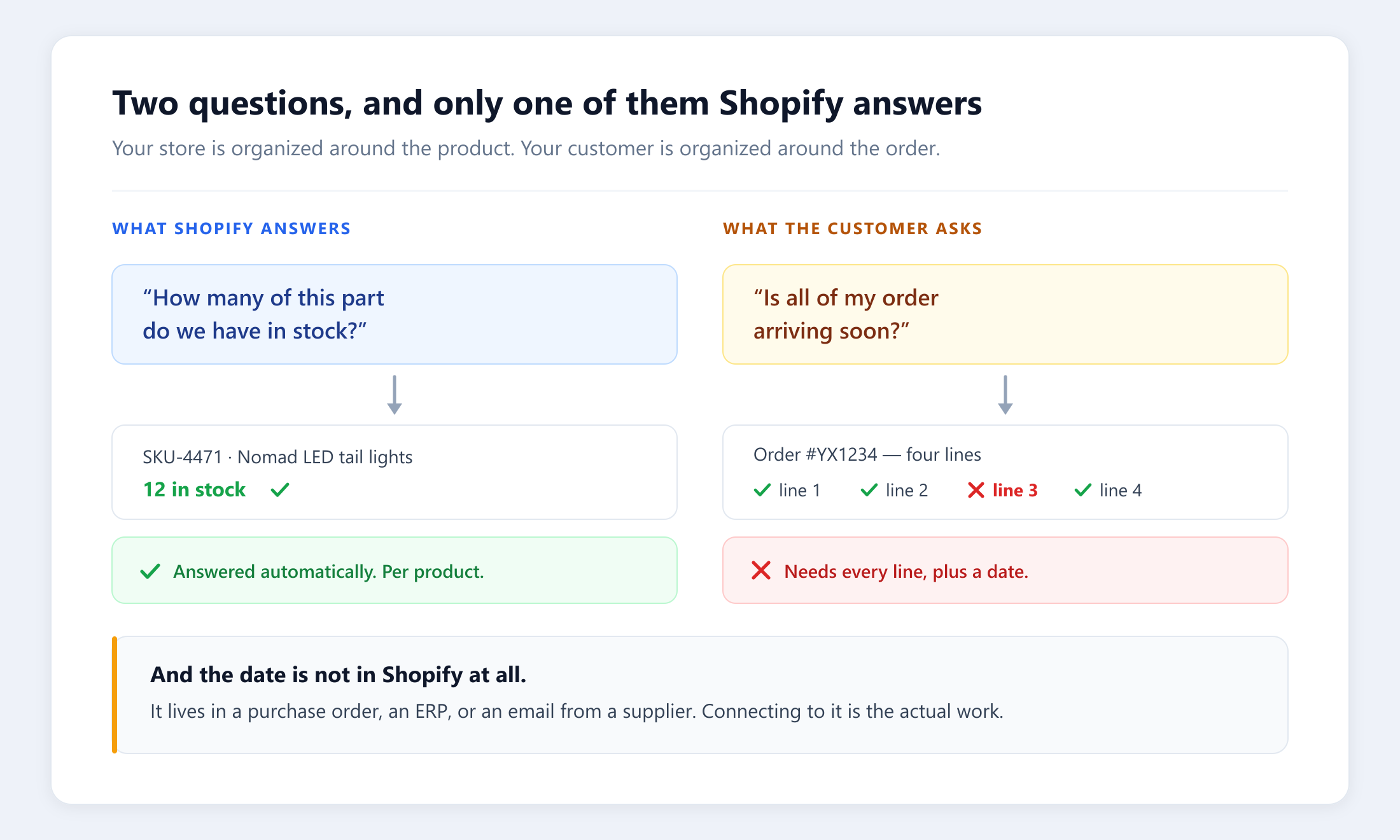
Shopify is organized around the product. It will tell you, instantly and accurately, how many of SKU-4471 you have. The customer’s question is organized around the order: four lines, one of them short, and what happens to the whole shipment as a result. Answering that means walking every line of every order, and then finding an arrival date that Shopify does not hold. That date lives in a purchase order, in an ERP, or in an email from a supplier.
That is why this work stays manual in so many operations. It is not that teams do not care. It is that each one takes five to seven minutes of a person’s time, and there are more orders in a day than there are minutes to give them.
How does a Shopify backorder notification actually work?
When a new order arrives from Shopify, the automation:
- Checks every line against real stock, not the product page’s displayed availability but the actual fulfillable quantity.
- Identifies the short lines, where fulfillable quantity is below what was ordered.
- Reads the context that decides the message: order value, what else is on the order, and the expected arrival date where a connected system holds one.
- Writes the customer, through your support desk, with an explanation, a date if a date exists, and the choice of splitting the shipment or waiting.
The whole sequence takes about fifteen minutes from the order landing, well before the customer has a reason to write in. The reply comes back to your team as a normal ticket, and a person makes the call on what the customer chose.
That last part is deliberate. The automation handles the part that is mechanical and endless. The judgment stays with your team.
What it is not
It is not a deflection tool, and we will not describe it as one.
“Deflection” claims a customer would have contacted you and then did not, which is a counterfactual no dataset can observe. Plenty of vendors quote a deflection number anyway. We measure what is actually on the record: which orders had short lines, which customers were contacted, when, and the order value at stake.
For Yota Xpedition, that came to 1,493 orders representing $510,323.61 in order value addressed between May and August 2026. Every one of those is a logged execution with a timestamp, not an estimate.
Order value addressed, to be exact about it. It means we reached the customer on an order worth that much while there was still time to do something. It does not claim the sale was saved, because proving that needs a different join and we have not built it. When we do, we will say so.
The notification itself goes out about fifteen minutes after the order lands, which is the part that matters to the customer. The part that mattered to Yota’s support team was second-order. Those ETA inquiries were 95% of their backlog, all of them asking a question a day-one message already answered. Once the reach-outs ran on every order, the tickets stopped arriving, and Yota’s overall first response time moved with them: 52 hours in January, inside their 8 hour target every month from June. Nobody was typing faster. There was simply less to type.
Where does the arrival date come from?
The single hardest part of this is not the notification. It is the date.
A customer told “your item is backordered” with no date is barely better off than a customer told nothing. The message that works says when, and getting to when means reading from whatever system actually holds your inbound inventory. Sometimes that is a purchase order in an ERP. Sometimes it is a supplier feed. Sometimes it is a spreadsheet someone updates on Tuesdays.
This is why backorder notification is rarely a plug-in-and-go install. Connecting Shopify to the place your arrival dates live is the work, and it is the part that gets abandoned when a project is handed over as a script with nobody accountable for it.
It is also why this is the first automation we build for most distributors. Once the connection to your inbound inventory exists, it feeds more than the notification.
One of several, not the whole picture
Backorder Notification is one automation in the live catalog, alongside low-stock impact alerts, high-risk order responses, delivery exception alerts, and more. It activates as part of a Concierge engagement, where your embedded engineer handles the connections, the message configuration, and the tuning over the first 30 to 60 days.
And the same order and inventory data feeding the notification also feeds your live dashboard and the weekly analysis. One model of your operation, put to three uses, rather than three separate builds.
An Assessment starts by looking at your actual order history: how many orders carry short lines, where your arrival dates live today, and what reaching those customers on time would take.
Common questions
Does Shopify send backorder notifications automatically?
No. Shopify sends an order confirmation that confirms the order, not the fulfillment state. It carries no line-item inventory awareness and has no view of what is on a purchase order, so a customer whose order contains a short line receives a generic confirmation that says nothing about the delay. Sending a real backorder notification requires reading fulfillable quantity per line and an arrival date from whatever system holds your inbound inventory.
How do you tell a customer when a backordered item will ship?
By reading the expected date from the system that actually holds it, usually a purchase order in an ERP or a supplier feed, and sending it before the customer asks. Shopify knows an item is out of stock; it does not know when more is arriving. The date is the hard part, not the message: a customer told "your item is backordered" with no date is barely better off than a customer told nothing.
What is the difference between a backorder notification and a restock alert?
A restock alert is pre-purchase: a shopper asks to be told when an out-of-stock product becomes available again. A backorder notification is post-purchase: an order has already been taken, one or more lines cannot ship yet, and the customer needs to know what happens to the shipment they have already paid for. Most Shopify apps in this space handle the first case. The second is where the manual support work accumulates.
Can you split a shipment when only part of the order is backordered?
Yes, and giving the customer that choice is usually the point of the message. The notification explains which lines are short, gives an arrival date where one exists, and offers the option of shipping what is available now or waiting for the complete order. The customer replies into your support desk as a normal ticket and a person makes the call.
How long does it take to send a backorder notification after an order is placed?
About fifteen minutes from the order landing in the setup described here, which is well before most customers have a reason to write in. Speed matters less than the date being right, but reaching the customer before they open a ticket is what changes the support load rather than just the support experience.